TypeScript Custom Tools Tutorial
Build custom tools as a TypeScript Spin component.
For full TypeScript component documentation, see Spin JavaScript Components.
Prerequisites
- Spin CLI installed
- Node.js 20+ (required for native bindings in the Spin JS SDK build tools)
Step 1: Create Your Project
Use the Spin template to create a new TypeScript HTTP component:
This creates a project with the correct structure and dependencies.
Replace the contents of src/index.ts:
interface ToolResult {
  success: boolean;
  result: string;
  error_type?: string;
}

// Tool handlers
function handleGetWeather(args: Record<string, unknown>): ToolResult {
  const location = args.location as string;
  if (!location) {
    return {
      success: false,
      result: "Missing required: location",
      error_type: "InvalidArguments",
    };
  }

  // Mock weather data - replace with real API call if needed
  const weatherData = {
    location: location,
    temperature: 72,
    condition: "sunny",
    humidity: 45,
  };

  return { success: true, result: JSON.stringify(weatherData) };
}

function handleGetForecast(args: Record<string, unknown>): ToolResult {
  const location = args.location as string;
  const days = (args.days as number) || 3;

  if (!location) {
    return {
      success: false,
      result: "Missing required: location",
      error_type: "InvalidArguments",
    };
  }

  // Mock forecast data - replace with real API call if needed
  const allDays = [
    { day: "Monday", high: 75, low: 60, condition: "sunny" },
    { day: "Tuesday", high: 72, low: 58, condition: "partly cloudy" },
    { day: "Wednesday", high: 68, low: 55, condition: "cloudy" },
  ];

  const forecast = {
    location: location,
    days: allDays.slice(0, days),
  };

  return { success: true, result: JSON.stringify(forecast) };
}

const TOOL_HANDLERS: Record<string, (args: Record<string, unknown>) => ToolResult> = {
  get_weather: handleGetWeather,
  get_forecast: handleGetForecast,
};

async function handleRequest(request: Request): Promise<Response> {
  const url = new URL(request.url);
  const path = url.pathname.replace("/weather", "") || "/";
  const headers = { "content-type": "application/json" };

  // Health check
  if (path === "/health" && request.method === "GET") {
    return new Response(
      JSON.stringify({ status: "healthy", component: "weather" }),
      { status: 200, headers }
    );
  }

  // Execute tool
  if (path === "/execute" && request.method === "POST") {
    try {
      const body = await request.json() as {
        tool?: string;
        args?: Record<string, unknown>;
      };
      const { tool, args } = body;

      let result: ToolResult;
      if (tool && TOOL_HANDLERS[tool]) {
        result = TOOL_HANDLERS[tool](args || {});
      } else {
        result = {
          success: false,
          result: `Unknown tool: ${tool}`,
          error_type: "UnknownTool",
        };
      }

      return new Response(JSON.stringify(result), { status: 200, headers });
    } catch (e) {
      return new Response(
        JSON.stringify({ success: false, error: (e as Error).message }),
        { status: 400, headers }
      );
    }
  }

  // 404
  return new Response(
    JSON.stringify({ error: "not found" }),
    { status: 404, headers }
  );
}

//@ts-ignore
addEventListener("fetch", (event: FetchEvent) => {
  event.respondWith(handleRequest(event.request));
});
Step 2: Update spin.toml
The template creates a spin.toml file. Update the route to use /weather/...:
spin_manifest_version = 2

[application]
name = "weather-tools"
version = "0.1.0"

[[trigger.http]]
route = "/weather/..."
component = "weather-tools"

[component.weather-tools]
source = "dist/weather-tools.wasm"
allowed_outbound_hosts = []

[component.weather-tools.build]
command = "npm run build"
Step 3: Build and Run
Test your component:
# Health check
curl http://localhost:3000/weather/health

# Execute tool
curl -X POST http://localhost:3000/weather/execute \
  -H "Content-Type: application/json" \
  -d '{
    "session_id": "test",
    "tool": "get_weather",
    "args": {"location": "Seattle"}
  }'
Expected output:
{
  "success": true,
  "result": "{\"location\":\"Seattle\",\"temperature\":72,\"condition\":\"sunny\",\"humidity\":45}"
}
Step 4: Configure DeepFabric
Create config.yaml:
topics:
  prompt: "Weather-related assistant tasks"
  mode: tree
  depth: 2
  degree: 3

generation:
  system_prompt: "You are a weather assistant that helps users with weather information."

  conversation:
    type: chain_of_thought
    reasoning_style: agent

  tools:
    spin_endpoint: "http://localhost:3000"
    custom:
      - name: get_weather
        description: "Get current weather for a location"
        parameters:
          - name: location
            type: str
            description: "City name"
            required: true
        returns: "Weather data including temperature and conditions"
        component: weather-tools

      - name: get_forecast
        description: "Get weather forecast for upcoming days"
        parameters:
          - name: location
            type: str
            description: "City name"
            required: true
          - name: days
            type: int
            description: "Number of days (1-7)"
            required: false
        returns: "Forecast data for requested days"
        component: weather-tools

    max_per_query: 2
    max_agent_steps: 3

  llm:
    provider: "openai"
    model: "gpt-4o"

output:
  num_samples: 20
  batch_size: 5
  save_as: "weather-tools-dataset.jsonl"
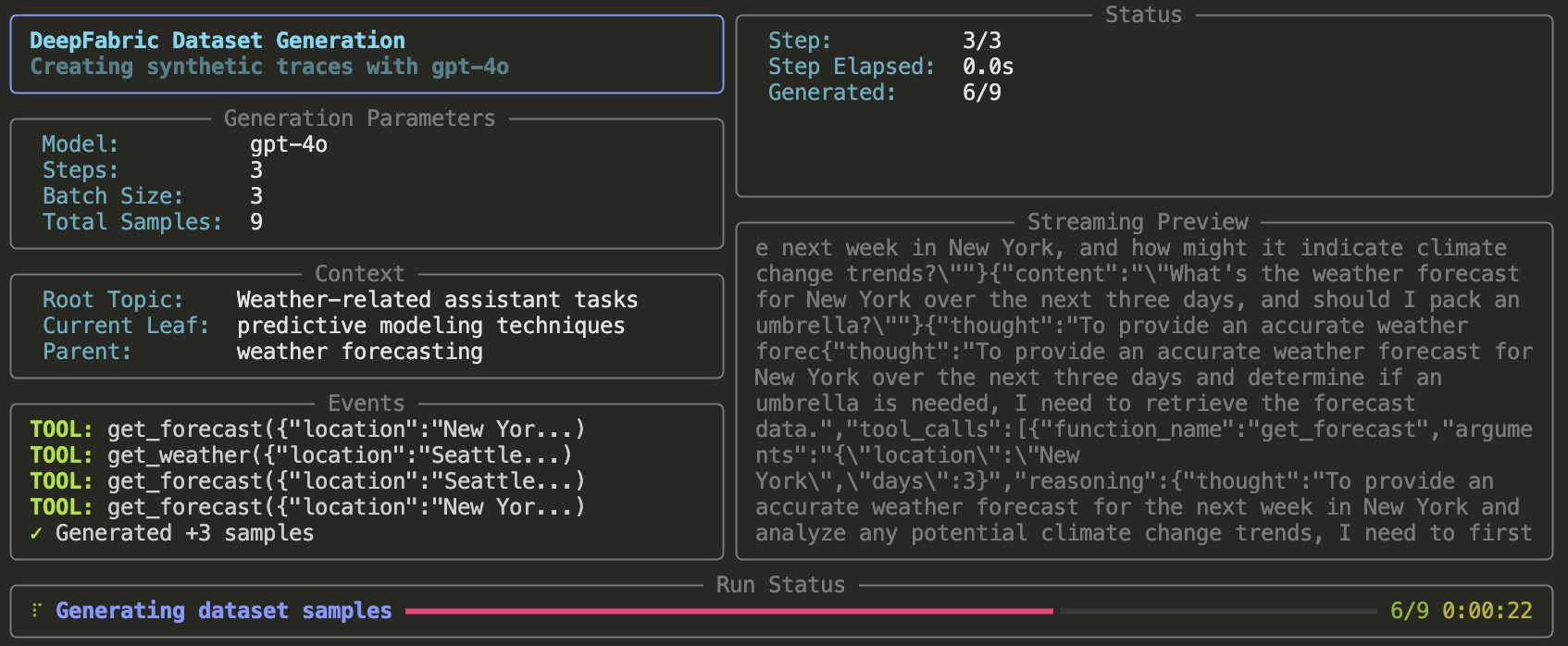
Step 5: Generate Dataset
Calling External APIs
To call real external APIs instead of returning mock data, you'll need an API key. You can get a free API key from OpenWeatherMap.
Once you have your API key, make these three changes:
1. Update spin.toml
Add allowed_outbound_hosts to permit outbound requests and define the API key variable:
spin_manifest_version = 2

[application]
name = "weather-tools"
version = "0.1.0"

[variables]
openweathermap_api_key = { required = true }

[[trigger.http]]
route = "/weather/..."
component = "weather-tools"

[component.weather-tools]
source = "dist/weather-tools.wasm"
allowed_outbound_hosts = ["https://api.openweathermap.org"]

[component.weather-tools.variables]
api_key = "{{ openweathermap_api_key }}"

[component.weather-tools.build]
command = "npm run build"
2. Update src/index.ts
Replace your src/index.ts with this version that calls the OpenWeatherMap API:
import { get as getVariable } from "@spinframework/spin-variables";

interface ToolResult {
  success: boolean;
  result: string;
  error_type?: string;
}

// Tool handlers
async function handleGetWeather(args: Record<string, unknown>): Promise<ToolResult> {
  const location = args.location as string;
  if (!location) {
    return {
      success: false,
      result: "Missing required: location",
      error_type: "InvalidArguments",
    };
  }

  const apiKey = getVariable("api_key");
  const encodedLocation = encodeURIComponent(location);
  const url = `https://api.openweathermap.org/data/2.5/weather?q=${encodedLocation}&appid=${apiKey}&units=metric`;

  try {
    const response = await fetch(url);
    if (!response.ok) {
      return {
        success: false,
        result: `API error: ${response.status}`,
        error_type: "APIError",
      };
    }
    const data = await response.text();
    return { success: true, result: data };
  } catch (e) {
    return {
      success: false,
      result: `Request failed: ${(e as Error).message}`,
      error_type: "APIError",
    };
  }
}

async function handleGetForecast(args: Record<string, unknown>): Promise<ToolResult> {
  const location = args.location as string;
  const days = (args.days as number) || 3;

  if (!location) {
    return {
      success: false,
      result: "Missing required: location",
      error_type: "InvalidArguments",
    };
  }

  const apiKey = getVariable("api_key");
  const encodedLocation = encodeURIComponent(location);
  // cnt parameter limits the number of 3-hour forecast periods (8 per day)
  const cnt = Math.min(days * 8, 40); // Max 40 periods (5 days)
  const url = `https://api.openweathermap.org/data/2.5/forecast?q=${encodedLocation}&appid=${apiKey}&units=metric&cnt=${cnt}`;

  try {
    const response = await fetch(url);
    if (!response.ok) {
      return {
        success: false,
        result: `API error: ${response.status}`,
        error_type: "APIError",
      };
    }
    const data = await response.text();
    return { success: true, result: data };
  } catch (e) {
    return {
      success: false,
      result: `Request failed: ${(e as Error).message}`,
      error_type: "APIError",
    };
  }
}

const TOOL_HANDLERS: Record<string, (args: Record<string, unknown>) => Promise<ToolResult>> = {
  get_weather: handleGetWeather,
  get_forecast: handleGetForecast,
};

async function handleRequest(request: Request): Promise<Response> {
  const url = new URL(request.url);
  const path = url.pathname.replace("/weather", "") || "/";
  const headers = { "content-type": "application/json" };

  // Health check
  if (path === "/health" && request.method === "GET") {
    return new Response(
      JSON.stringify({ status: "healthy", component: "weather-tools" }),
      { status: 200, headers }
    );
  }

  // Execute tool
  if (path === "/execute" && request.method === "POST") {
    try {
      const body = await request.json() as {
        tool?: string;
        args?: Record<string, unknown>;
      };
      const { tool, args } = body;

      let result: ToolResult;
      if (tool && TOOL_HANDLERS[tool]) {
        result = await TOOL_HANDLERS[tool](args || {});
      } else {
        result = {
          success: false,
          result: `Unknown tool: ${tool}`,
          error_type: "UnknownTool",
        };
      }

      return new Response(JSON.stringify(result), { status: 200, headers });
    } catch (e) {
      return new Response(
        JSON.stringify({ success: false, error: (e as Error).message }),
        { status: 400, headers }
      );
    }
  }

  // 404
  return new Response(
    JSON.stringify({ error: "not found" }),
    { status: 404, headers }
  );
}

//@ts-ignore
addEventListener("fetch", (event: FetchEvent) => {
  event.respondWith(handleRequest(event.request));
});
3. Install the variables package and rebuild
Install the Spin variables package, then rebuild and run with your API key:
npm install @spinframework/spin-variables
spin build
SPIN_VARIABLE_OPENWEATHERMAP_API_KEY=your-api-key spin up
Spin variables use the SPIN_VARIABLE_ prefix with the variable name in uppercase.
Next Steps
- Package as Docker image - see Custom Tools